PROTOS miniHIL GUI
The front end built for the PROTOS miniHIL, a small hardware-in-the-loop test rig. It is a React (Next.js) app that lets you watch a test run on the hardware as it happens: live logs, signal traces and execution state, all streamed from the device while the test executes. The harder problem behind the views was the data path and performance. A test run produces a lot of data on an MCU. Additionally, the goal was to allow the user to open multiple browser windows showing different aspects of the test run.
The data comes off the miniHIL hardware itself, an STM32-based MCU system that runs the test cases in real time. The hardware is connected to the PC via USB (1.1 full speed device). A Java backend on the PC owns that USB link, deserializes the low-level protocols, and exposes the result to the GUI over a WebSocket. Inside the browser a single shared worker holds the websocket connection and fans the decoded stream out to every open window.
PROTOS miniHIL GUI
The PROTOS miniHIL is a small hardware-in-the-loop, or rather MCU-in-the-loop, test rig. You wire your device-under-test to it using jumper wires, and the rig exercises that target in real time while running test cases against it.
To provide test execution observability during runtime a GUI was needed. The brief: show the live logs, signal traces and the execution state as the tests run.
A previously existing Java backend was already used for headless test execution, so the goal was to reuse that and build a web-based front end on top of it. The result was a React app that uses different components to show different aspects of the test run.
There were a couple of challanges along the road: the integration with existing legacy code and protocols, the performance of the data path from the device to the views, and the requirement to allow multiple windows open at once without them fighting each other for the same data, and last but not least the a data handling pipeline that was fast and lean enough to handle the streamed data without choking the browser.
How the pieces fit together
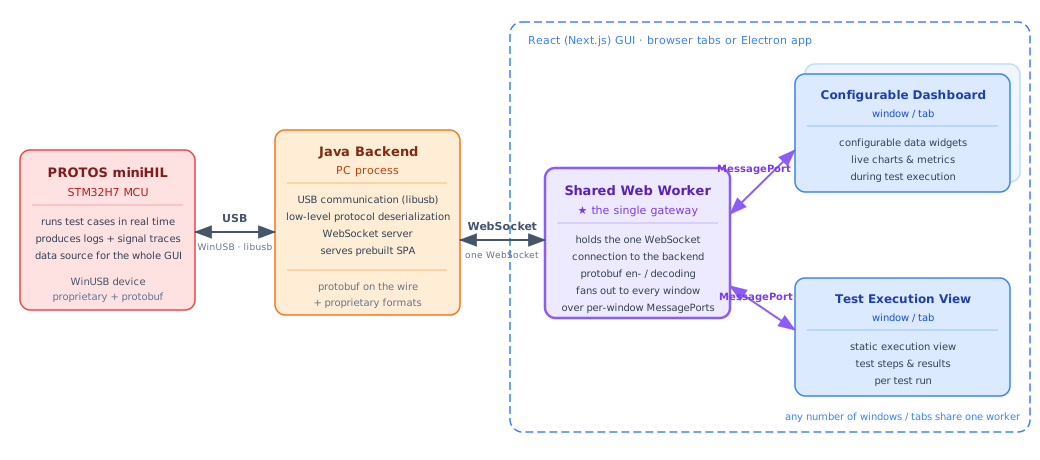
There are three layers: The miniHIL hardware runs the tests and is the source of every information the GUI ever shows. A Java backend on the PC sits in the middle, it handles USB communication and enriches the test data with test model information. The React GUI renders the result, and a single shared worker inside it is the thing that lets many windows watch the same run.
Where the data comes from
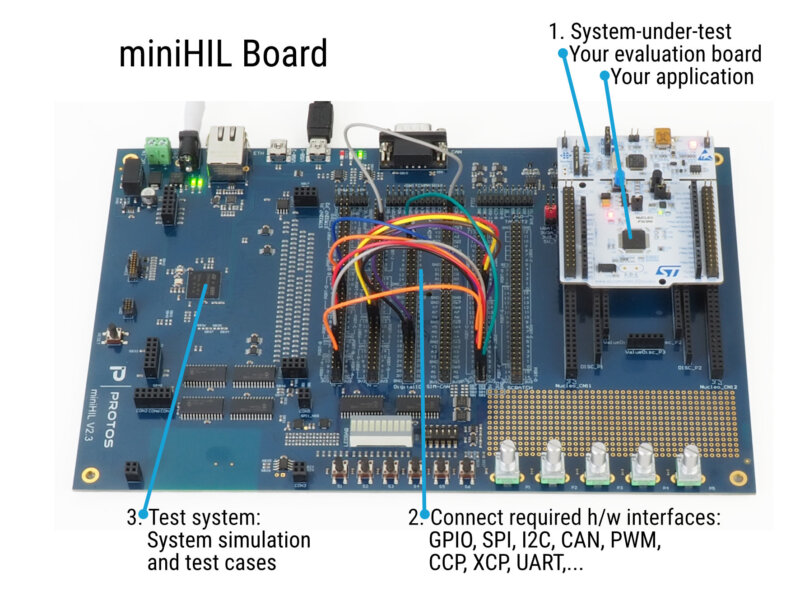
The miniHIL board. The user wires a device-under-test to it, and the board exercises that target in real time while the GUI makes the run observable.
The miniHIL is an STM32-based MCU system that runs the test cases in real time. Everything the GUI displays, the logs, the signal traces and the execution state, is produced on the device (partially binary encoded). While the PC backend augments the data with additional context, nothing is synthesized on the PC. The front end is a viewer onto a stream it does not own, so most of the work is about transporting and decoding that stream faithfully rather than computing anything.
The board presents itself to the PC as a WinUSB device, reached from the PC side through libusb. On the wire it mixes proprietary low-level protocols with Google Protocol Buffers (protobuf).
The Java backend
The backend owns the USB link through libusb, deserializes the low-level protocols coming off the device, and re-exposes the decoded data to the GUI over a WebSocket.
The backend is also responsible for enriching the raw data from the device with additional context from the miniHILs test model, mostly translation of identifiers into plaintext strings. In addition it prerenders some of the traces using plantUML.
The backend also offers some control services such as USB enummeration, connection management, etc. to the GUI. These services are exposed protobuf encoded websocket messages.
It also serves the prebuilt single-page app for the dashboard. That means the GUI can be opened in a plain browser pointed at the backend, with no desktop install required. (The Electron build, further down, reuses this exact arrangement.)
The GUI
The front end is a React app built create react app (and now ported to next.js), written in TypeScript, and shipped both as a browser app and as an Electron desktop app. It presents different views: a configurable data dashboard and a static test execution view.
The gui connects to the backend via websocket. While the backend strips the proprietary low level protocol the remaining communication is still protobuf encoded. For performance reasons the websocket connection is owned by a single SharedWorker that handles protobuf decoding and encoding for all browser windows. The decoded messages are modeled as RxJS observables that flow from the worker all the way into the React views. This architecture allows multiple windows to watch the same test run without multiplying the backend traffic or the decode work. This also keeps the views in sync with each other.
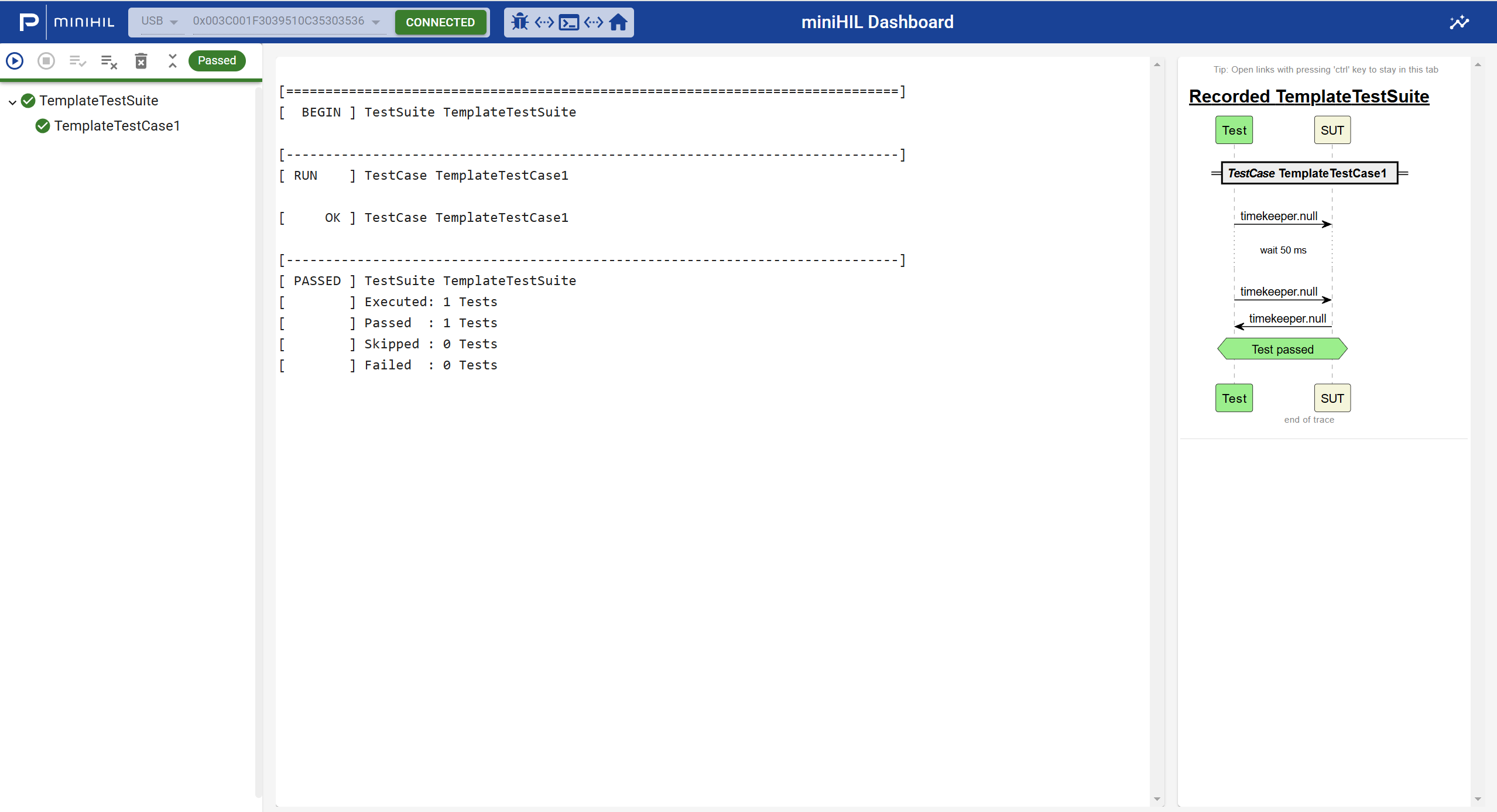
The static test execution view. The test suite tree sits on the left, the live run log in the center, and a recorded message sequence chart of the trace on the right.
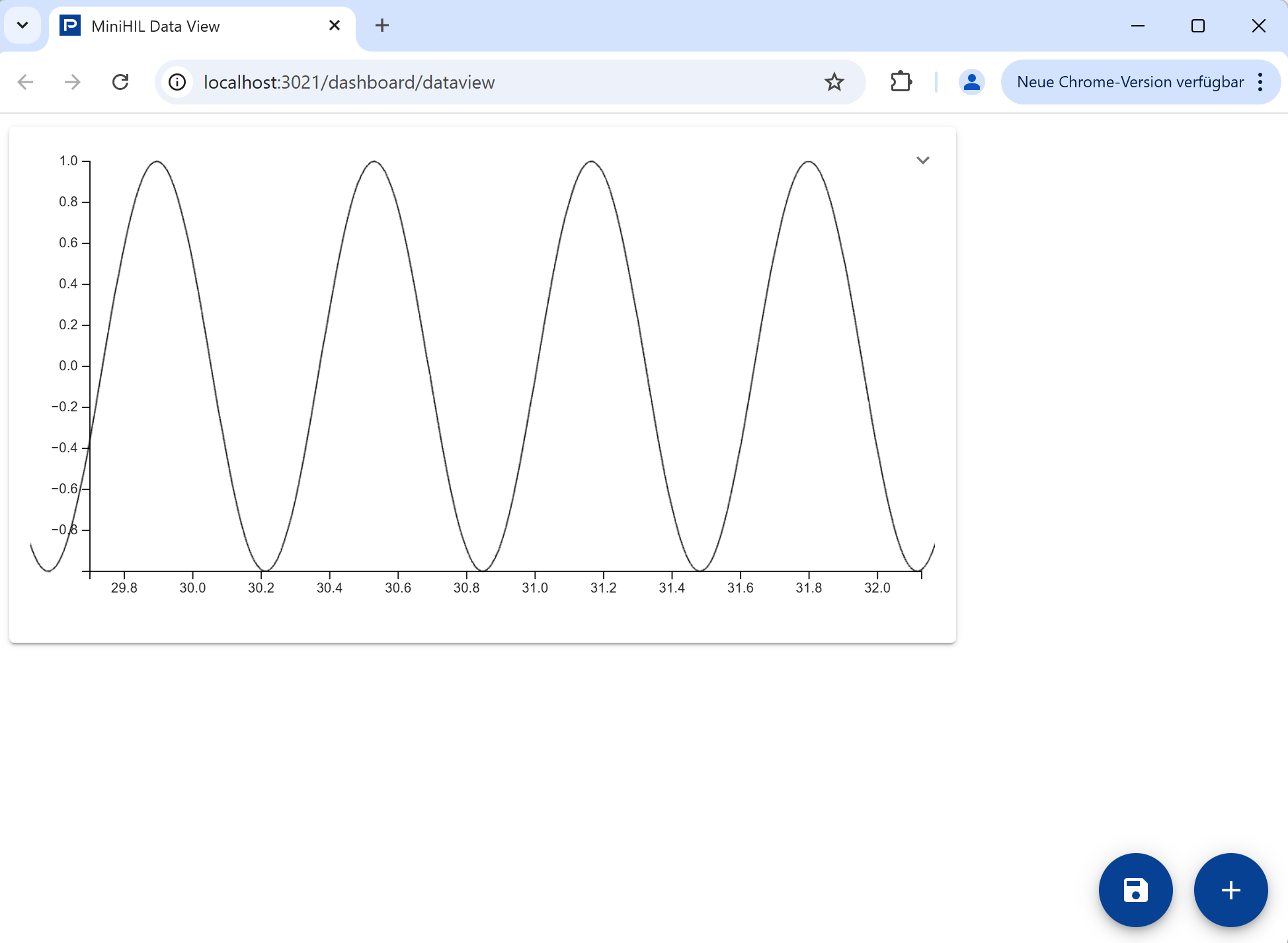
The configurable data dashboard. Signal traces streamed from the device are plotted live as chart widgets the user can arrange. The line-chart widget is built on TimeChart, a WebGL-based charting library that keeps up with high-rate streaming data while still allowing interactive zoom and auto-scrolling.
One connection for every window
Here is the problem that drove the most interesting part of the design. A user often wants more than one window open: the dashboard on one screen, the execution view on another, maybe a second dashboard with different widgets. The naive approach gives each tab its own WebSocket to the backend, which means each tab also decodes the same protobuf stream independently. Two windows double the backend traffic and the decode work. Four windows quadruple it. That scales the wrong way.
So a SharedWorker between the windows and the backend was used. The browser keeps exactly one instance of it alive per origin, no matter how many tabs are open, and that one instance owns the single WebSocket connection. All the protobuf encoding and decoding happens there, once, and the decoded streams are passed as RxJS observables to each window.
Each window talks to the worker over its own MessagePort, using the Channel Messaging API. When a window connects, the worker's onconnect handler receives a dedicated port for it (event.ports[0]). The worker keeps a registry of every connected port and fans the decoded logs and traces out across all of them. A window subscribes only to what it actually shows.
The payoff is that backend traffic and decode cost stay flat as windows are added, and every window is reading from the same decoded stream, so the dashboard and the execution view can never drift out of sync with each other.
Decoupling legacy message formats: Messages wrapped inside messages
The same pattern shows up at more than one layer of the data path, so it is worth pulling out on its own. At each hop, one message format is carried inside another as an opaque payload. The transport layer never parses what it is carrying. It just moves the bytes and lets the endpoint that cares do the decoding.
The backend-to-frontend link uses an outer envelope of server and client messages that carries the inner board or dashboard message as an opaque protobuf byte field. The backend tunnels messages between the board and the GUI without re-parsing them. It forwards the inner bytes, and only the endpoint that the message is actually for decodes it. One layer down, those protobuf messages are themselves the payload of the miniHIL's proprietary transport protocol, a simple framed packet of length, channel id and payload.
The reason to do this is decoupling. An intermediate hop can route or relay a message it does not understand, and a change to an inner message format does not ripple out into the code that only moves bytes around. The transport stays stable while the things it carries evolve.
Shipping it as a desktop app
The browser-served GUI is convenient, but it assumes someone has a backend running and a URL to point at. For users who just want to launch a program, the same React app also ships as a self-contained Electron desktop app that carries everything it needs in one download.
The Electron build, driven by electron-builder, packs three things together:
- The prebuilt single-page app, a static Next.js export plus its
public/assets, packed into the app'sasararchive. - The Java backend, shipped as an extra resource alongside the app.
- A bundled JRE, so the app runs the backend with its own
javaand does not depend on Java being installed on the PC.
At launch, the Electron main process spawns the backend as a headless child process, pointing the classpath at the packaged jars. Once the backend is up, the Electron BrowserWindow is pointed at the local dashboard URL. The desktop app is, in the end, the same browser app and the same WebSocket architecture as before. The only difference is that a managed, bundled backend now travels with it, so the whole thing launches as a single application.